Image capture
This page explains how to correctly take a photo of the medical device when the reading is recorded via camera, whether the capture is taken by the patient or by a healthcare professional assisting them.
When this applies
Use these instructions whenever Doctomatic requests an image of the device screen to process a reading.
:::tip Quick checklist
Before submitting the image, always check these five points:
- The device appears completely within the frame.
- The distance is approximately
15 to 20 cm. - The camera is parallel to the device.
- There are no reflections, shadows or blur.
- The numbers can be read clearly.
:::
How to take a valid capture
- Place the device on a stable surface with good lighting.
- Center the device in the image and make sure the entire screen is visible.
- Maintain an approximate distance of
15 to 20 cm. - Position the camera parallel to the device, without tilting it.
- Avoid reflections, shadows and blurry areas.
- Verify that the numbers are sharp, legible and correctly oriented before confirming.

Temporary image example with size and caption for the manual.
Pending capture: show the actual screen where the patient or healthcare professional is focusing on the complete device before confirming the reading.
Visual examples reused from the manual
The following images are from the manual ExtS01ESP Rev. 01 and serve as a visual reference to quickly distinguish a correct capture from an incorrect one.
Framing and legibility
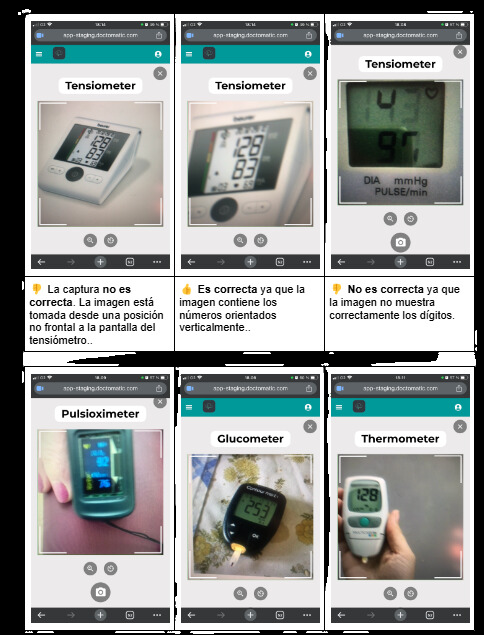
In this section you can see a correct reference when the device screen is centered and the digits are clearly readable, and an incorrect reference when the image does not correctly show the values.
Distance and orientation
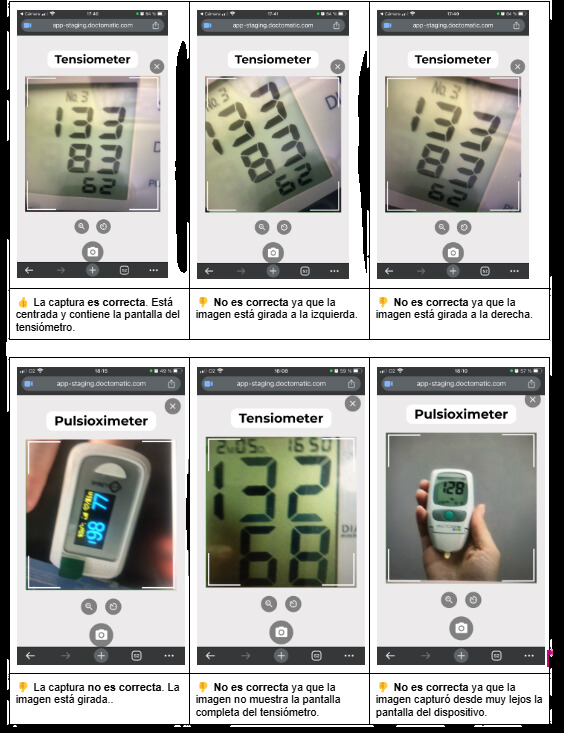
These examples help identify three common mistakes:
- image rotated to the left or right
- capture taken too close or too far away
- incomplete screen within the photo
Reflections and framing errors
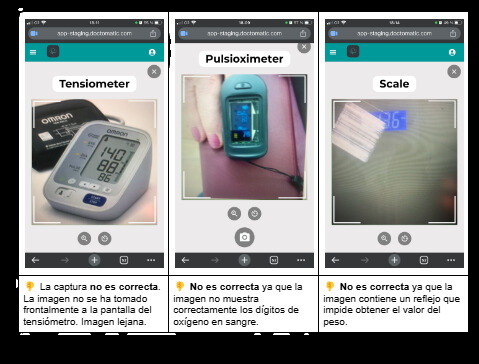
Here you can see that a capture becomes invalid when there is a strong reflection, when the angle is not frontal, or when the device is not properly represented on screen.
What you should avoid
- Cropping part of the device screen.
- Taking the photo too close or too far away.
- Tilting the phone or taking the image at an angle.
- Capturing the reading with glare, shadows or blur.
- Submitting images where the numbers cannot be read clearly.
Privacy and security
- Do not include visible personal information around the device if it is not necessary.
- If a healthcare professional takes the capture, they should review the framing before submitting it.
- The photo must correspond to a medical device correctly used according to its manufacturer's instructions.
If you are assisting someone during the capture
If the reading is taken by a healthcare professional for their patient, or if the patient needs help:
- use this same checklist as a quick guide
- confirm legibility before submitting
- check that no unnecessary personal data appears around the device
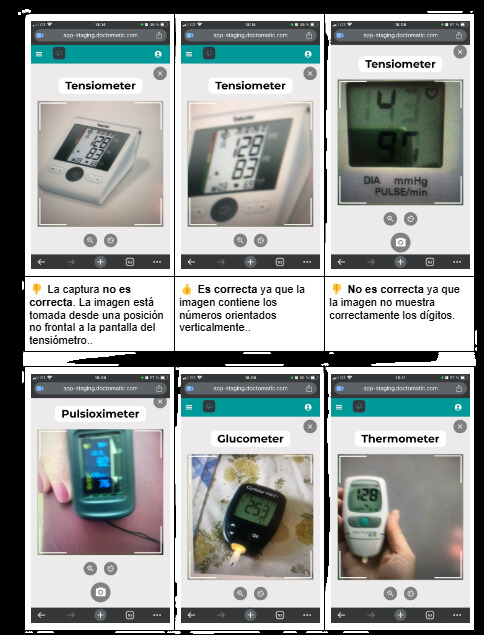
Temporary example to reserve space for a future guided capture.
Pending capture: show a correct photo taken by a healthcare professional, with the device centered, the full screen visible and an appropriate distance of 15 to 20 cm.
If the reading does not come out well
- Retake the capture adjusting distance and angle.
- Clean the camera lens if the image is blurry.
- Find an area with uniform lighting and no reflections.
- If the problem continues, contact your care team or support.
Support
For technical questions related to image capture or processing, use the support channels defined by your team or write to soporte@doctomatic.com if that is the designated channel for your deployment.