Devices
The Devices section groups the devices or integrations enabled for the patient's follow-up within Doctomatic.
Depending on the device type
- A measurement can be recorded using the browser camera.
- A form associated with the device can be opened.
- There may be additional specific flows depending on the clinical configuration.
Using the camera
If the browser requests permission to use the camera, the patient must accept it in order to continue.
When a reading is recorded by photographing the device, also follow the captura-imagenes guide to ensure that Doctomatic can process it correctly.
Recommendations for photographing the device
- Center the device and capture its entire screen.
- Maintain an approximate distance of
15 to 20 cm. - Position the camera parallel to the device.
- Avoid reflections, shadows or blur.
- Verify that the numbers are sharp and legible before submitting.
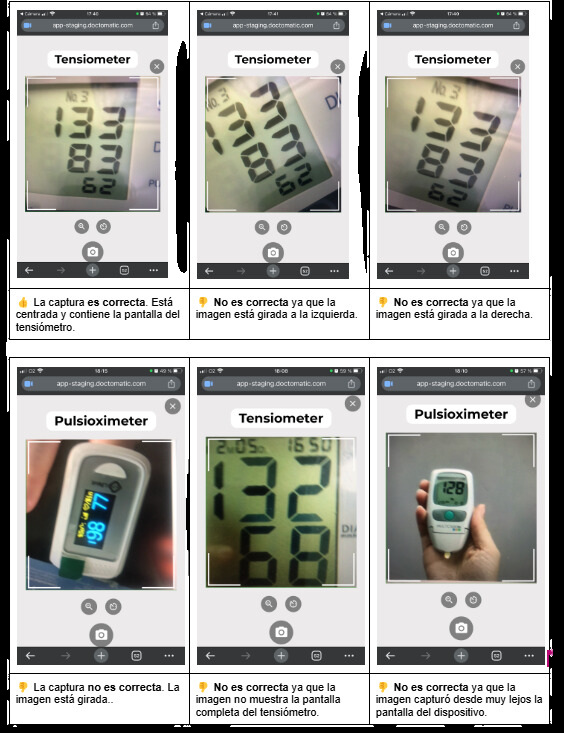
Temporary image example to document the device capture flow.
Pending capture: show the actual device or camera screen at the moment a reading is being prepared via device image.
If the camera does not work:
- Check the browser or operating system permissions.
- Make sure no other application is using the camera.
- Try reloading the page or using another up-to-date browser.