Devices and readings
Although this manual covers the web and not the mobile app, the physician can access devices, forms, and the detail of previously recorded readings from the web.
What to review in this section
Check:
- which device generated the reading
- whether there is an attached image
- whether there are forms associated with the follow-up
- where the detected value is displayed
- when the data is sufficient and when it is advisable to open more detail
Quality criteria for image-based readings
If the physician participates directly in validating image-based readings, follow these guidelines:
- device fully visible
- approximate distance of
15 to 20 cm - camera parallel, without tilt
- no reflections, shadows, or blur
- values clearly legible before confirming the reading
For complete capture guidelines, also refer to pacientes/captura-imágenes.
Associated forms
When the follow-up includes forms:
- verify that the form corresponds to the correct case
- confirm that the response is linked to the expected patient
- use the form as a complement to the clinical context, not as a substitute for the reading
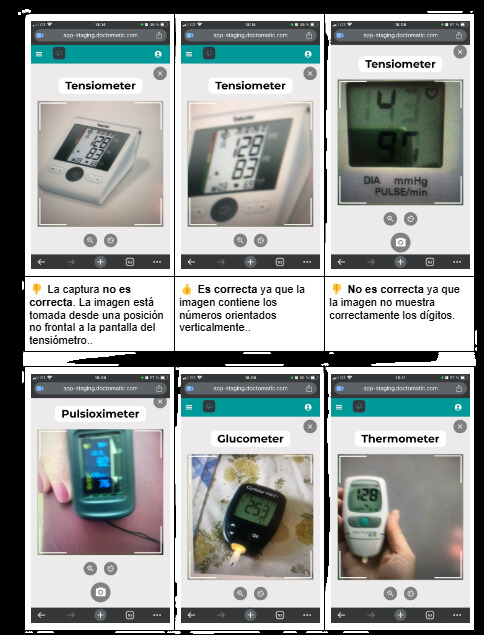
Temporary example for an image-based reading.
Pending screenshot: show the actual detail of a reading with its value, the associated device image, and the clinical context from the patient record or from alerts.